



Near miss report form: report hazards in seconds, before anyone gets hurt
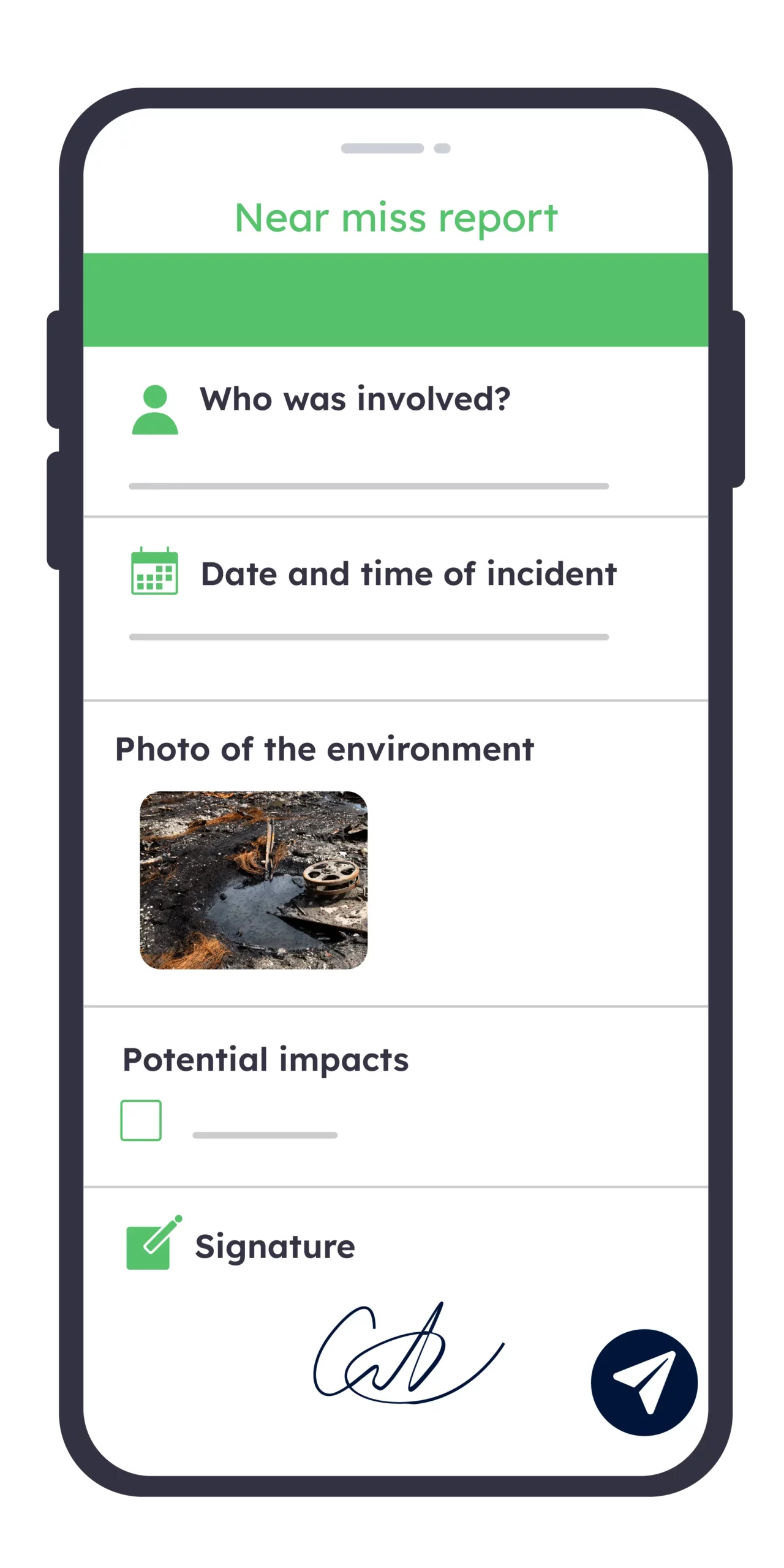
Report a near miss from your phone in seconds, not on a paper form nobody fills in: take a photo, record the location and say what could have happened. The person in charge is alerted immediately, and every corrective action is tracked until it is closed.
Try it free for 15 days
Free trial
Advantages
Catch the warning before the accident
A near miss report records an event that caused no injury but could have, such as a load falling beside a worker. If someone was hurt, use our accident and incident report form instead. On paper, most near misses go unreported; with near miss reporting on a phone, it takes seconds.
Without Kizeo Forms

- Near misses kept quiet, never written down
- Hazard described from memory, no photo
- Vague location, “somewhere near bay 4”
- Report waits in a supervisor’s tray
- Unsafe condition left in place for weeks
- No view of recurring hazards
With Kizeo Forms

- Near miss reported in seconds, on site
- Photo of the hazard attached instantly
- Exact location recorded by geolocation
- Person in charge alerted straight away
- Unsafe condition fixed before the next shift
- Trends by site, task and cause
Report in seconds, on site
A short form with a photo, the location and a few taps means teams report close calls instead of shrugging them off. The quicker it is to report, the more near misses you hear about.

Fix hazards before injuries
Each report reaches the person in charge of the area with the photo and location, so the trailing cable or blocked walkway is made safe the same day. Every action gets an owner and a due date, and stays open until it is done.

Spot hazards that keep returning
Export your near miss reports to compare sites, tasks and causes, and see where the same slip, trip or falling object keeps coming back. Use the trends to choose the topic of your next toolbox talk or safety inspection.

Flag dangerous occurrences straight away
A few questions pick out the near misses that RIDDOR lists as dangerous occurrences, such as a scaffold collapse or a failure of lifting equipment. Your health and safety lead is alerted immediately, so no report to the HSE is missed.

How does it work?
Adapt our template to your sites and hazards
Pick the near miss report in the Kizeo Forms library and add your sites, hazard categories and dangerous occurrence questions in a few clicks. Already have a paper form? The AI turns it into a mobile form in seconds.

Snap the hazard, pin the location, describe it
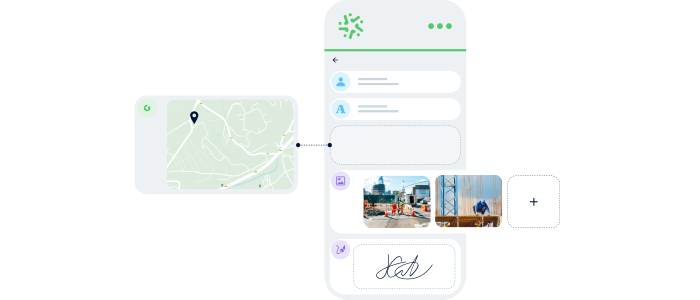
On a phone or tablet, the worker who saw it photographs the hazard, the location is recorded automatically, and a few taps describe what happened and what could have happened. It takes less time than walking to the site office.
Alert the area owner and flag dangerous occurrences
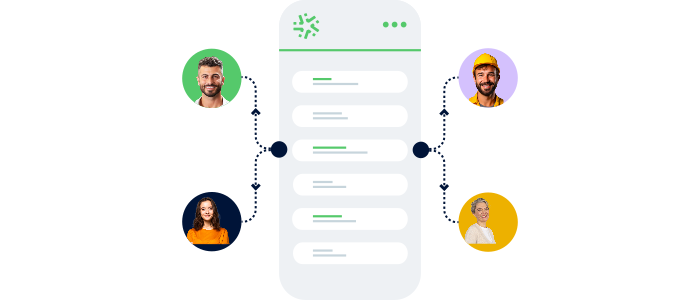
As soon as the report is sent, the person in charge of the area receives it by email with the photo and location. If the answers point to a dangerous occurrence, your health and safety lead is alerted at the same time.
Close the action and analyse near miss trends
Once the hazard is made safe, the owner adds a photo of the fix and closes the action. Every report is saved as a PDF, and your near miss data exports to Excel to follow hazards by site, task and cause.

A solution for all departments
Tools designed to report and prevent every near miss
Construction site, warehouse, factory floor or depot: the same near miss report adapts to every workplace and every hazard. Each report adds to one record of close calls, so you act on the warning signs before they become accidents.
25+ custom field types

Records where each near miss happened, so the hazard is easy to find on a large site and repeat locations stand out.

Shows the hazard exactly as it was found, the trailing cable or leaning stack, so whoever fixes it knows what to look for.

Multiplies likelihood by potential severity into a risk score, so you know which near misses to investigate first.
Key features

Workers describe the near miss out loud, gloves on, and the report is filled in automatically, so even the busiest shift has time to report.

Lay out each near miss report in your own Word or Excel template, with your logo, the photo, the location and the risk score, ready to share at your next safety meeting.

Report close calls in basements, cold stores or remote sites with no signal. Everything is kept on the device and sent as soon as the network returns.
Try out our near miss report template
Open our ready-made near miss report in the Kizeo Forms library, and have your first close call reported before the end of the shift.
- Time and place: date, time and GPS position recorded automatically, with the site, the area and the manager who receives the report.
- What happened: a short description of the near miss, the people involved and any witnesses, with photos of the hazard.
- Potential outcome and risk score: the hazard type, what could have happened to staff, visitors or equipment, and a score based on likelihood and severity.
- Dangerous occurrence check: whether the event is listed in Schedule 2 of RIDDOR, and when it was reported to the HSE.
- Actions and close-out: what was done straight away, corrective actions with an owner and a due date, then the signature of the person reporting.
Testimonials

Balfour Beatty VINCI relies on Kizeo Forms for health and safety observations, enabling efficient information sharing with other departments to drive improvements and ensure best practices.

Lenka Vosvrdova
Site Construction Agent at Balfour Beatty VINCI

From manual tasks to digital efficiency: Kizeo Forms helps Equans save time, optimise processes, and make faster decisions.

Hicham Benbacer
Digital Solutions Director, Equans
Kizeo Forms has been instrumental in reducing paper use and eliminating manual data entry, greatly simplifying our processes. The ease of implementation and the application’s useful table feature perfectly align with our needs.

Mathilde Morin
Quality and SERE Manager at Schneider Electric
More than near misses: digitise every step of your safety routine
View all our templatesAccident report form

Incident reporting
Legal and Insurance Purposes
Reduce risk by creating safety programmes and ensuring corrective actions
Safety and Health Compliance
Sectors
-
Agriculture

-
Construction
-
Healthcare
-
Hospitality
-
Manufacturing
-
Pest control
-
Real estate
-
Safety


Health and Safety Inspection Checklist
Identify trends or areas of concern that need attention to prevent future incidents
Identifying hazards and risks and putting in place control measures
Reduce risk by creating safety programmes and ensuring corrective actions
Safety and Health Compliance
Sectors
-
Agriculture
-
Construction
-
Healthcare
-
Hospitality
-
Manufacturing
-
Pest control
-
Real estate
-
Safety
Toolbox Talk Template
Educate staff about potential hazards and the importance of following protocols.
Legal and Insurance Purposes
Safety and Health Compliance
Sectors
-
Agriculture
-
Construction
-
Manufacturing
-
Safety
Everything you need to know about the Near miss Report
What is a near miss? Examples from the workplace
The HSE defines a near miss as an event that caused no injury or ill health, but could have. Nobody was hurt this time, often by luck alone. Typical examples:
- Construction site: a brick falls from a scaffold and lands a metre from a labourer.
- Warehouse: a reversing forklift truck just misses a pedestrian in the aisle.
- Workshop: a sleeve catches on an unguarded drill and is pulled free in time.
- Office or shop: someone slips on a wet floor with no warning sign, but keeps their balance.
If someone was hurt, it is no longer a near miss: record it with an accident report form instead.
Is near miss reporting a legal requirement in the UK?
Not as a general rule: no law requires you to report every near miss to the HSE. But near miss reporting helps you meet duties that do apply:
- the Management of Health and Safety at Work Regulations 1999 require you to monitor your health and safety measures and review your risk assessments when they may no longer be valid;
- HSE guidance (HSG65, Managing for health and safety) treats near misses as a key source of information for checking that your controls work;
- some near misses, called dangerous occurrences, must be reported under RIDDOR 2013 (see the next question).
Insurers, clients and principal contractors also increasingly ask to see a near miss record.
Which near misses must be reported to the HSE under RIDDOR?
Dangerous occurrences, listed in Schedule 2 of RIDDOR 2013, must be reported even if nobody was hurt. Examples include:
- the collapse, overturning or failure of load-bearing parts of lifting equipment, other than lifting accessories such as slings and shackles;
- plant or equipment coming into contact with overhead power lines;
- the complete or partial collapse of a scaffold more than 5 metres high;
- an electrical short circuit or overload causing a fire or explosion;
- the accidental release of a substance that could cause injury or damage to health.
The responsible person, usually the employer, must report without delay, using the HSE’s online form, and within 10 days at most. RIDDOR applies in Great Britain; in Northern Ireland, reports go to HSENI.
What should a near miss form include?
A useful near miss form stays short enough to fill in on the spot, but answers the key questions:
- the date, time and exact location;
- what happened, and what could have happened;
- the people involved and any witnesses;
- the type of hazard (slip or trip, falling object, vehicle, electrical, fire);
- a risk rating, based on likelihood and potential severity;
- photos of the hazard;
- the immediate action taken and suggested corrective actions;
- the name of the person reporting, unless your policy allows anonymous reports.
How do you get workers to report near misses?
Most near misses go unreported because reporting takes too long, or because people fear being blamed. To change that:
- Make it quick: a form on the phone they already carry, completed in under a minute. A QR code posted in each area can open the form with the location already filled in.
- Make it blame-free: state clearly that near miss reports are used to fix hazards, not to discipline people.
- Show what changed: tell reporters what was done with their report, and share examples at toolbox talks.
- Count reports as a positive: a rising number of near miss reports usually means a healthier safety culture, not a more dangerous site.
How do you analyse near miss trends?
A single near miss is a warning; a series of them shows where the next accident is likely to happen. Useful indicators:
- the number of near misses reported per site, per month;
- the share of reports closed within the agreed time;
- the most frequent hazard types, tasks and locations;
- the high-risk near misses that keep coming back.
Safety research such as Frank Bird’s accident triangle suggests that hundreds of near misses occur for every serious injury. Acting on near miss trends means tackling those causes before one turns into an accident. Use the findings to target your next safety inspection.
Can I download a free near miss report form PDF?
Yes. Our free PDF covers the time and place, what happened and who saw it, the potential outcome with a risk score, a dangerous occurrence check, and corrective actions with sign-off. You can print it and keep a pad on site, or fill it in on a computer.
When you want reports to reach the right person in seconds, use the near miss report template in the Kizeo Forms library, or import your own form: the AI turns it into a mobile form your teams can complete on site.
How long should you keep accident records, and how do you keep them confidential?
Minimum periods:
- RIDDOR records: at least three years from the date of the entry.
- Accident book entries: at least three years from the date of the last entry.
- Personal injury claims can usually be brought up to three years after the injury, and longer for a child, so many organisations keep records for 6 years or more.
Accident records contain personal and health data, so UK GDPR applies: only the people who need them should see them. With Kizeo Forms:
- access rights decide who can read, edit or export each report,
- every report is saved with its date, location, photos and signatures,
- data is hosted in Europe.
Can one form cover near misses, hazard observations and unsafe acts?
Yes. With Kizeo Forms, one reporting form can handle all of them:
- the first question asks what is being reported: near miss, unsafe condition, unsafe act or positive observation;
- conditions then show only the relevant questions, so each report stays short;
- every report keeps its type, so you can follow trends for each category separately.
Your teams only have one form to remember, whatever they spotted.
How much does Kizeo Forms cost for near miss reporting?
Pricing is per user per month, for unlimited forms and reports, not per near miss report:
- Smart plan: from £15 per user per month (annual billing). It includes AI-generated forms, offline access, personalised reports and email alerts.
- Business plan: from £25 per user per month (annual billing). It adds AI voice input, so workers can describe a near miss out loud, plus AI photo input and advanced reporting.
Try every feature free for 15 days, with no commitment and no credit card.